
Introduction
Every image you see on your smartphone, computer monitor, LED display, or website is created using a digital color system known as RGB. Whether you’re designing a company logo, creating a website banner, editing product images, or preparing artwork for promotional flags, understanding RGB color is essential for achieving vibrant and visually appealing designs.
The RGB color model is the foundation of digital graphics. It combines Red, Green, and Blue light in different intensities to produce more than 16.7 million unique colors. Each color is represented using an RGB color code, making it easy for designers, developers, and digital artists to create consistent visuals across various digital platforms.
For businesses that manufacture or order custom flags, feather flags, teardrop flags, advertising banners, exhibition displays, and promotional signage, understanding RGB colors is equally important. Most artwork is initially designed using RGB because design software and digital screens display colors using this model. However, before the artwork is printed on fabric or other materials, it is typically converted to the CMYK color model, which is specifically designed for printing.
At Infinity India Flags, we regularly work with customers who submit artwork in RGB format for products such as feather flags, teardrop flags, corporate flags, event banners, promotional displays, and exhibition branding materials. Knowing how RGB color codes work helps ensure that your digital design is optimized before it moves to the printing stage, resulting in more accurate and professional-looking final products.
In this comprehensive guide, you’ll learn:
- What RGB color is and how it works
- What an RGB color code represents
- How RGB colors are created
- Where RGB colors are commonly used
- The differences between RGB and CMYK
- Why RGB matters in flag and banner printing
- Best practices for preparing artwork for professional printing
Whether you’re a graphic designer, marketing professional, business owner, web developer, or someone planning to print custom branding materials, this guide will help you understand the role of RGB colors in both digital design and the printing industry.
What Is RGB Color?
RGB color is a digital color model that creates colors by combining three primary colors of light: Red (R), Green (G), and Blue (B). By adjusting the intensity of each of these three colors, digital devices can display millions of unique shades, making RGB the standard color system for screens and electronic displays.
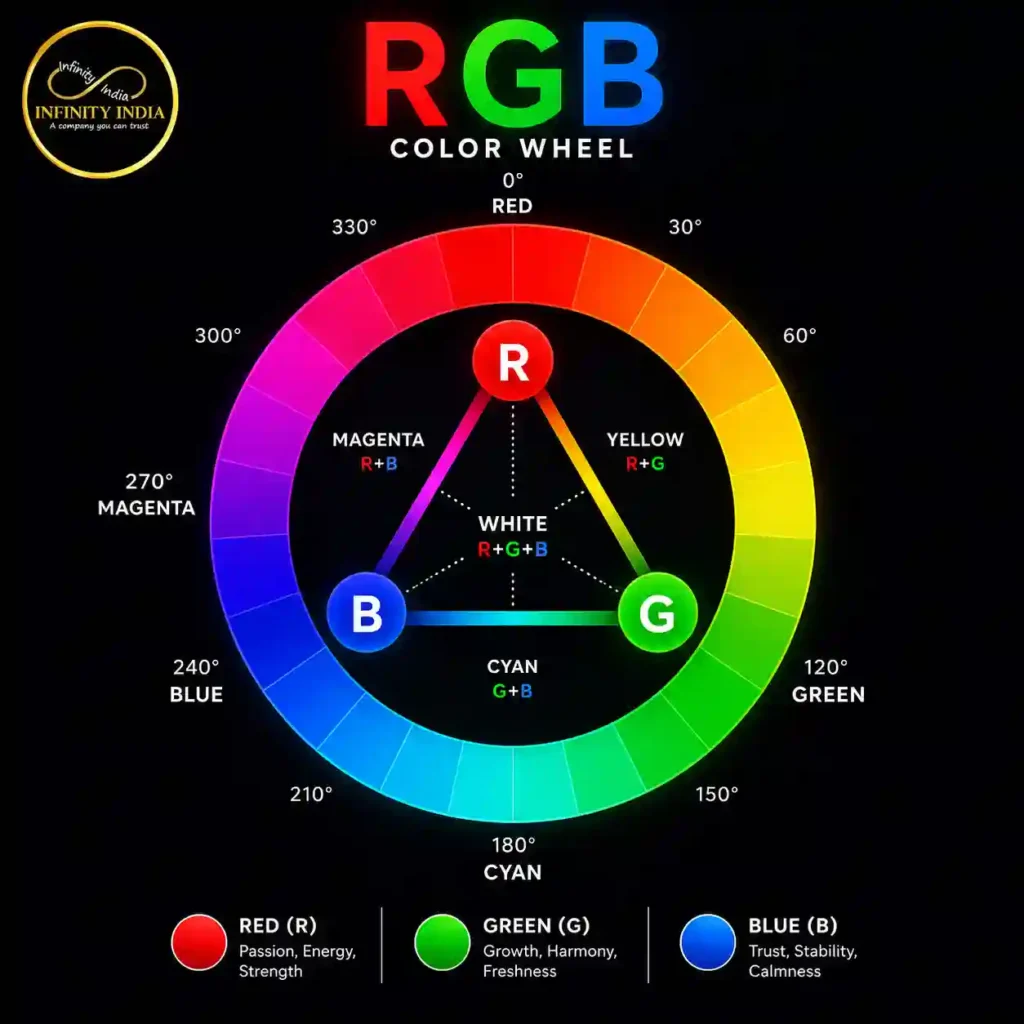
Unlike traditional printing, which uses ink, the RGB model is based on light. Every pixel on your smartphone, computer monitor, television, tablet, or LED display emits different amounts of red, green, and blue light. When these lights are mixed together at varying intensities, they produce a wide range of vibrant RGB colors.
For example:
- RGB (255, 0, 0) produces pure red.
- RGB (0, 255, 0) produces pure green.
- RGB (0, 0, 255) produces pure blue.
- RGB (255, 255, 255) creates white.
- RGB (0, 0, 0) creates black.
Since each color channel can have a value between 0 and 255, the RGB color model can generate over 16.7 million different colors, giving designers exceptional flexibility when creating digital artwork.
What Does RGB Stand For?
RGB is an abbreviation for:
- R – Red
- G – Green
- B – Blue
These are known as the primary colors of light. Unlike paint or ink, where colors become darker when mixed, RGB works by adding light together. This is why RGB is called an additive color model.
As the intensity of red, green, and blue light increases, brighter colors are created. When all three colors are displayed at their maximum intensity, the result is white. When all three are absent, the result is black.
Why Is RGB Used for Digital Displays?
Modern electronic devices rely on RGB because screens produce light rather than reflect it. Every display is made up of tiny pixels, and each pixel contains red, green, and blue sub-pixels. By changing the brightness of these sub-pixels, the screen can accurately display photographs, videos, graphics, animations, and text.
You’ll find RGB colors used in:
- Websites and web applications
- Mobile apps
- Computer software
- Social media graphics
- Digital advertisements
- LED displays
- Television screens
- Gaming monitors
- Digital billboards
Because of its ability to produce bright and vibrant visuals, RGB has become the global standard for digital content creation.
Why Understanding RGB Is Important for Flag and Banner Printing
Although flags, banners, and promotional displays are printed using the CMYK color model, most artwork begins its journey in RGB. Designers commonly create logos, illustrations, and branding materials in software such as Adobe Photoshop, Illustrator, Figma, Canva, or CorelDRAW, where RGB is often the default color mode for digital projects.
For businesses ordering custom printed products such as:
- Feather Flags
- Teardrop Flags
- Corporate Flags
- Advertising Banners
- Exhibition Backdrops
- Promotional Display Systems
understanding RGB helps ensure that the initial artwork is prepared correctly before it is converted for printing.
At Infinity India Flags, we recommend discussing color requirements during the design stage, especially if your brand relies on specific corporate colors. Proper RGB-to-CMYK conversion and professional color management help achieve printed flags and banners that closely match your original digital design, delivering consistent branding across both online and offline marketing materials.
How Does the RGB Color Model Work?
The RGB color model works by combining different intensities of Red (R), Green (G), and Blue (B) light to create a wide spectrum of colors. Unlike traditional printing methods that use colored inks, RGB relies on light emission, making it the ideal color model for digital displays such as smartphones, computer monitors, televisions, tablets, LED screens, and projectors.
Every color you see on a digital screen is produced by mixing these three primary colors of light in varying proportions. By increasing or decreasing the intensity of each color channel, devices can display everything from deep blacks to brilliant whites and millions of shades in between.
The Additive Color Model Explained
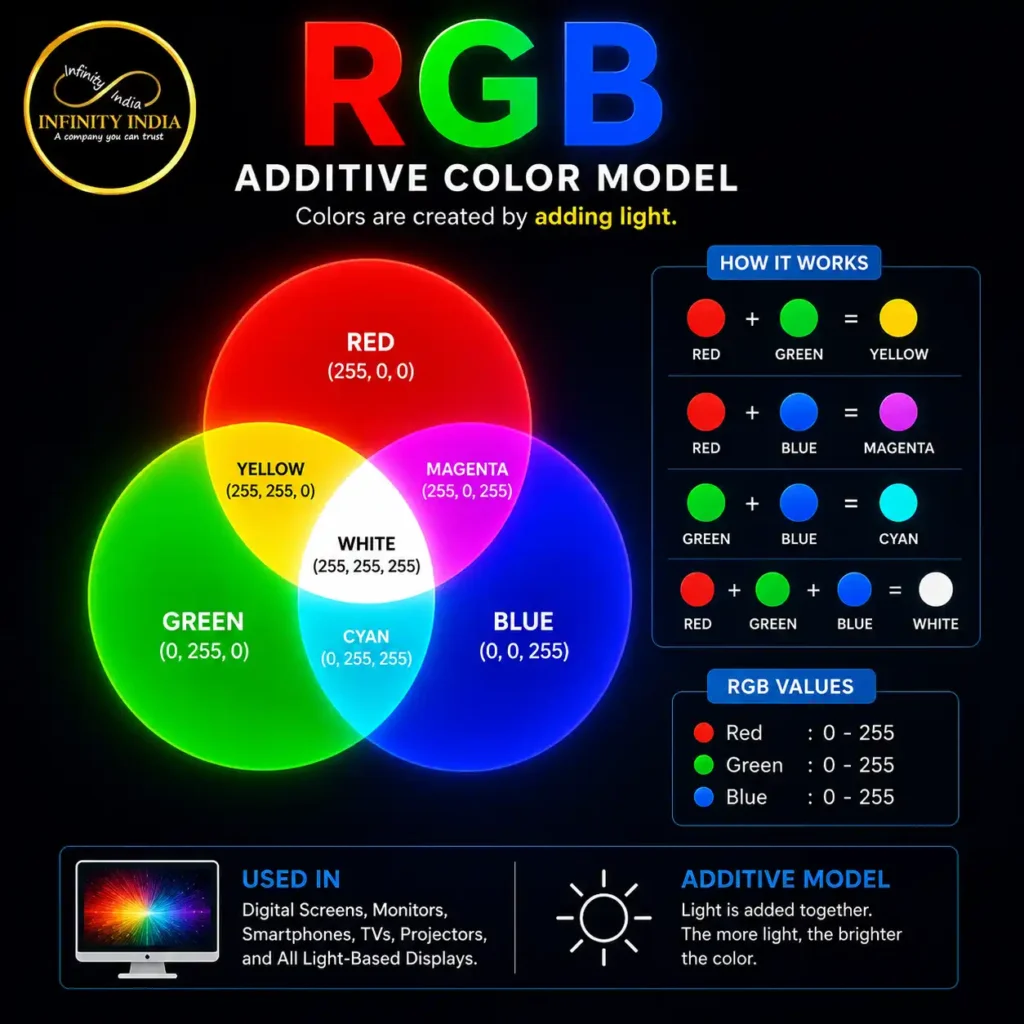
RGB is known as an additive color model because colors are created by adding light together.
Here’s how it works:
- When Red, Green, and Blue are all set to 0, there is no light, resulting in Black.
- As the intensity of each color increases, the displayed color becomes brighter.
- When all three colors reach their maximum value (255, 255, 255), they combine to produce White.
This is the opposite of the CMYK color model, where adding inks makes colors darker. Since screens emit light rather than absorb it, RGB is the preferred choice for all digital applications.
Understanding RGB Color Values
Each RGB color consists of three numerical values:
- Red: 0–255
- Green: 0–255
- Blue: 0–255
A value of 0 means that color is not present, while 255 represents its maximum intensity.
For example:
| Color | RGB Color Code |
| Black | RGB (0, 0, 0) |
| White | RGB (255, 255, 255) |
| Red | RGB (255, 0, 0) |
| Green | RGB (0, 255, 0) |
| Blue | RGB (0, 0, 255) |
| Yellow | RGB (255, 255, 0) |
| Cyan | RGB (0, 255, 255) |
| Magenta | RGB (255, 0, 255) |
Since each channel has 256 possible values (including 0), the RGB model can produce:
256 × 256 × 256 = 16,777,216 unique RGB colors.
This enormous color range allows designers to create realistic photographs, smooth gradients, vibrant branding, and detailed digital artwork.
How RGB Colors Are Created
Different combinations of red, green, and blue produce different colors. Here are a few examples:
- Red + Green = Yellow
- Red + Blue = Magenta
- Green + Blue = Cyan
- Red + Green + Blue = White
By adjusting the brightness of each channel, designers can create subtle pastel tones, rich dark shades, and everything in between.
For instance:
- RGB (255, 128, 0) creates a bright orange.
- RGB (75, 0, 130) produces a deep indigo.
- RGB (173, 216, 230) results in a light blue shade.
These precise combinations help maintain consistent colors across websites, mobile apps, digital advertisements, and user interfaces.
Why RGB Colors Look So Bright
One of the biggest advantages of the RGB color model is its ability to produce bright and vibrant colors. Because digital screens generate light directly, RGB colors often appear more vivid than printed colors.
This is why images displayed on a monitor or smartphone may look brighter than the same design after it has been printed. Screens can reproduce highly saturated RGB colors that standard printing inks cannot always match exactly.
What This Means for Flag and Banner Printing
For businesses creating artwork for custom flags, advertising banners, exhibition displays, and promotional signage, understanding how the RGB color model works is extremely important.
Most customers design their artwork digitally using RGB because software like Adobe Photoshop, Illustrator, Canva, Figma, and CorelDRAW uses RGB as the default color mode for screen-based projects. These vibrant RGB colors help visualize how the final design will appear on digital devices and during the approval process.
However, professional printing uses the CMYK color model, which means the artwork must be converted before production. During this conversion, certain highly saturated RGB colors—such as neon greens, electric blues, or bright oranges—may appear slightly different in print because inks cannot reproduce every color visible on a digital screen.
At Infinity India Flags, our team carefully reviews customer artwork before printing feather flags, teardrop flags, corporate flags, event banners, and promotional display systems. By optimizing RGB designs for professional printing and using advanced color management techniques, we help achieve printed products that closely match the original digital artwork while maintaining consistent brand colors across all marketing materials.
What Is an RGB Color Code?
An RGB color code is a numerical representation of a specific color created by combining different amounts of Red (R), Green (G), and Blue (B). Every color displayed on a digital screen can be identified using a unique RGB color code, making it easy for designers, developers, and printers to reproduce consistent colors across websites, applications, digital advertisements, and design software.
Each RGB color code consists of three numbers, representing the intensity of the red, green, and blue channels. These values range from 0 to 255, where:
- 0 means the color channel has no intensity.
- 255 means the color channel is displayed at full intensity.
For example:
| Color | RGB Color Code |
| Black | RGB (0, 0, 0) |
| White | RGB (255, 255, 255) |
| Red | RGB (255, 0, 0) |
| Green | RGB (0, 255, 0) |
| Blue | RGB (0, 0, 255) |
| Yellow | RGB (255, 255, 0) |
| Cyan | RGB (0, 255, 255) |
| Magenta | RGB (255, 0, 255) |
| Orange | RGB (255, 165, 0) |
| Purple | RGB (128, 0, 128) |
These RGB color codes act as a universal language for digital design, ensuring that the same color can be recreated accurately across different devices and software.
How Are RGB Color Codes Written?
RGB color codes are typically written in the following format:
RGB (Red, Green, Blue)
For example:
- RGB (255, 0, 0) = Pure Red
- RGB (0, 255, 0) = Pure Green
- RGB (0, 0, 255) = Pure Blue
- RGB (255, 255, 255) = White
- RGB (0, 0, 0) = Black
Each number corresponds to the brightness of one color channel. By changing these values, you can create virtually any color needed for digital artwork.
Why Are RGB Color Codes Important?
RGB color codes provide precision and consistency. Instead of describing a color as “dark blue” or “light green,” designers can specify an exact RGB value that can be reproduced accurately across various digital platforms.
They are commonly used in:
- Website design
- Mobile app interfaces
- UI/UX design
- Graphic design
- Social media graphics
- Video editing
- Photography
- Digital advertising
- Brand identity design
Using the correct RGB color code ensures that logos, illustrations, icons, and other visual elements maintain a consistent appearance, regardless of where they are displayed.
RGB Color Codes in Web Design
Web developers frequently use RGB color codes in HTML and CSS to define text colors, background colors, borders, buttons, and other interface elements.
For example, a company may define its primary brand color as RGB (0, 102, 204). By using this exact RGB color code throughout the website, the brand maintains a consistent visual identity across all pages.
This consistency is especially important for businesses that rely on strong branding, such as retail companies, corporate organizations, and manufacturers.
RGB Color Codes for Flag and Banner Artwork
For businesses ordering custom flags, feather flags, teardrop flags, advertising banners, and exhibition displays, RGB color codes play an important role during the design phase.
Designers often create artwork in RGB because digital design software displays colors using the RGB color model. This allows businesses to preview vibrant colors on computer screens before the artwork is sent for production.
For example:
- A retail brand may use a specific shade of blue in its logo.
- A corporate organization may have strict brand guidelines with defined RGB color codes.
- An event company may design colorful promotional banners using RGB artwork for client approval.
However, it’s important to understand that professional printing is performed using CMYK inks, not RGB light. Before printing, the RGB artwork is converted into the CMYK color space. During this process, some highly saturated RGB colors may appear slightly different because certain digital colors cannot be reproduced exactly with printing inks.
At Infinity India Flags, we carefully evaluate customer artwork and optimize colors before producing feather flags, teardrop flags, custom banners, exhibition graphics, and promotional display systems. Our experienced team helps ensure that the final printed product closely matches the intended brand colors while delivering sharp graphics and professional-quality results.
Tips for Using RGB Color Codes Effectively
To achieve the best results in digital design and printing, keep these best practices in mind:
- Use the exact RGB color codes specified in your brand guidelines.
- Save design files in high resolution before submitting them for printing.
- Preview artwork on multiple screens, as display settings can vary.
- Avoid relying on extremely bright neon RGB colors if the design will be printed.
- Consult your printing partner about color conversion to minimize differences between screen and print.
By understanding how RGB color codes work and how they interact with the printing process, businesses can create designs that look professional both online and on printed products such as flags, banners, exhibition displays, and promotional signage.
RGB Color Codes Chart
Understanding the most commonly used RGB color codes makes it easier to create consistent designs for websites, social media graphics, logos, marketing materials, and promotional products. Every color has a unique RGB color code that tells digital devices exactly how much Red, Green, and Blue light should be displayed to produce that specific shade.
Whether you’re designing a company logo, a website banner, or artwork for custom flags and advertising banners, using accurate RGB color codes helps maintain brand consistency throughout the design process.
Below are some of the most popular RGB colors used by designers and businesses.
Common RGB Color Codes
| Color | RGB Color Code | HEX Code | Common Uses |
| Black | RGB (0, 0, 0) | #000000 | Text, logos, premium branding |
| White | RGB (255, 255, 255) | #FFFFFF | Backgrounds, clean layouts |
| Red | RGB (255, 0, 0) | #FF0000 | Sales, promotions, warning signs |
| Green | RGB (0, 255, 0) | #00FF00 | Nature, sustainability, healthcare |
| Blue | RGB (0, 0, 255) | #0000FF | Corporate branding, technology |
| Yellow | RGB (255, 255, 0) | #FFFF00 | Attention-grabbing promotions |
| Orange | RGB (255, 165, 0) | #FFA500 | Retail campaigns, events |
| Purple | RGB (128, 0, 128) | #800080 | Luxury brands, creative businesses |
| Cyan | RGB (0, 255, 255) | #00FFFF | Technology, digital media |
| Magenta | RGB (255, 0, 255) | #FF00FF | Fashion, entertainment |
| Grey | RGB (128, 128, 128) | #808080 | Minimalist and professional designs |
| Navy Blue | RGB (0, 0, 128) | #000080 | Government, corporate identity |
Popular RGB Colors Used in Branding
Color plays a significant role in how customers perceive a brand. Many well-known businesses carefully select their RGB colors to communicate trust, innovation, luxury, excitement, or reliability.
Here are some common branding choices:
Blue RGB Colors
Blue is one of the most popular business colors because it represents trust, professionalism, confidence, and stability. It is widely used by technology companies, financial institutions, educational organizations, and corporate brands.
Red RGB Colors
Red is associated with energy, passion, urgency, and excitement. Businesses often use red for promotional campaigns, retail branding, clearance sales, and event marketing because it quickly attracts attention.
Green RGB Colors
Green symbolizes growth, sustainability, freshness, and health. It is commonly used by eco-friendly brands, healthcare organizations, agricultural companies, and wellness businesses.
Orange RGB Colors
Orange communicates enthusiasm, creativity, and friendliness. It is frequently used for promotional events, seasonal campaigns, and marketing materials designed to encourage customer engagement.
Black and White RGB Colors
Black and white remain timeless choices for premium branding. They create a clean, elegant, and professional appearance, making them ideal for luxury brands, corporate identities, and minimalist designs.
Choosing the Right RGB Color Codes for Your Brand
Selecting the right RGB color codes is about more than aesthetics. The colors you choose should align with your brand identity and remain consistent across all digital platforms.
When choosing RGB colors, consider:
- Your company’s brand guidelines
- Industry-specific color psychology
- Readability and accessibility
- Contrast for digital screens
- Compatibility with future printed materials
Using consistent RGB color codes helps create a recognizable brand image across websites, mobile applications, presentations, digital advertisements, and social media campaigns.
RGB Color Codes for Flag and Banner Design
For businesses involved in exhibitions, retail promotions, corporate events, and outdoor advertising, selecting the correct RGB color codes during the design stage is essential.
Designers commonly prepare artwork in RGB for products such as:
- Feather Flags
- Teardrop Flags
- Corporate Flags
- Event Banners
- Roll-Up Standees
- Fabric Displays
- Exhibition Backdrops
- Promotional Signage
The RGB color model allows businesses to visualize vibrant designs on computer screens before production begins. This makes it easier to review branding, typography, graphics, and overall layout.
However, it’s important to remember that the final printed product is produced using CMYK inks. During the RGB-to-CMYK conversion, some bright RGB colors—particularly neon greens, electric blues, and highly saturated oranges—may appear slightly different on fabric or vinyl.
At Infinity India Flags, we help customers achieve consistent branding by carefully reviewing RGB artwork before production. Whether you’re printing custom flags, feather flags, teardrop flags, advertising banners, or exhibition graphics, our team uses professional color management practices to produce high-quality prints that closely match your approved digital designs.
Pro Tip for Better Print Results
If you’re designing artwork for flags or banners, don’t rely solely on how colors appear on your monitor. Different screens display colors differently due to variations in brightness, calibration, and display technology.
For the most accurate results:
- Use high-quality design software.
- Follow your brand’s official RGB color codes.
- Share editable design files with your printing partner.
- Request a digital proof before production.
- Work with an experienced flag manufacturer who understands professional color conversion.
These simple steps can help ensure that your printed flags, banners, and promotional displays closely reflect your intended design while maintaining consistent brand colors across both digital and printed marketing materials.
Where Are RGB Colors Used?
The RGB color model is the standard for displaying colors on electronic screens. Since RGB is based on light rather than ink, it is used in virtually every digital device and application that displays images, videos, graphics, or text. From websites and mobile apps to digital advertising and creative design software, RGB colors ensure that visuals appear vibrant, sharp, and consistent across different screens.
For businesses, understanding where RGB colors are used is particularly important because most marketing materials are first designed digitally before being converted for professional printing.
Website Design
Every website you visit uses RGB colors. Web designers define colors using RGB color codes or HEX values in HTML and CSS to style elements such as:
- Website backgrounds
- Navigation menus
- Buttons
- Text
- Icons
- Banners
- Product images
- Call-to-action sections
Using consistent RGB color codes helps businesses maintain a professional and recognizable online presence while reinforcing their brand identity.
Mobile Applications
Smartphones and tablets display all graphics using the RGB color model. Whether it’s an Android app or an iOS application, every icon, button, animation, and image relies on RGB colors to produce smooth, vibrant visuals.
App designers use RGB color codes to create interfaces that are visually appealing, accessible, and easy to navigate across different screen sizes and resolutions.
Graphic Design Software
Professional design software is built around the RGB color model for digital projects. Designers create logos, illustrations, social media graphics, presentations, and advertisements using RGB colors before exporting them for various platforms.
Popular software includes:
- Adobe Photoshop
- Adobe Illustrator
- Adobe XD
- Figma
- Canva
- CorelDRAW
- Sketch
These tools allow designers to select exact RGB color codes, ensuring consistency throughout the creative process.
Social Media Graphics
Platforms like Facebook, Instagram, LinkedIn, X (formerly Twitter), and YouTube all display images and videos using RGB colors.
Businesses use RGB color codes to create:
- Social media posts
- Story graphics
- Promotional banners
- Video thumbnails
- Carousel designs
- Infographics
- Brand advertisements
Using consistent RGB colors across social media helps strengthen brand recognition and improves the overall visual experience for users.
Digital Advertising
Online advertisements are designed specifically for digital screens, making RGB the preferred color model for campaigns such as:
- Google Display Ads
- Facebook Ads
- Instagram Ads
- LinkedIn Sponsored Content
- YouTube Advertisements
- Website Banner Ads
Bright RGB colors attract attention and improve engagement, making them ideal for digital marketing campaigns.
Photography and Video Editing
Professional photographers and video editors work primarily in RGB because digital cameras, monitors, and editing software capture and display colors using light.
Applications such as Adobe Lightroom, Adobe Premiere Pro, Final Cut Pro, and DaVinci Resolve use RGB to preserve color accuracy during editing, ensuring that the final content looks vibrant across digital platforms.
LED Displays and Digital Signage
Large-format LED screens, digital billboards, airport displays, shopping mall signage, and exhibition screens all rely on RGB technology.
Each LED pixel contains red, green, and blue light sources that combine to produce vivid images visible even from long distances.
This is why digital billboards often appear brighter and more saturated than printed advertising materials.
Gaming consoles, computer monitors, VR headsets, and streaming platforms all depend on RGB colors to deliver immersive visual experiences.
Modern gaming displays even feature RGB lighting systems that allow users to customize keyboards, mice, and accessories with millions of color combinations.
How RGB Colors Are Used in Flag and Banner Design
Although custom flags and banners are ultimately printed using the CMYK color model, their design process almost always begins in RGB.
Graphic designers commonly create artwork for products such as:
- Feather Flags
- Teardrop Flags
- Advertising Banners
- Corporate Flags
- Event Backdrops
- Fabric Displays
- Roll-Up Standees
- Promotional Signage
using RGB colors because computer screens display artwork in the RGB color space.
This enables businesses to:
- Preview designs before printing.
- Review brand colors with stakeholders.
- Make design revisions quickly.
- Visualize graphics in presentations and digital mockups.
- Share artwork electronically with clients and printing companies.
For example, a retail business launching a new store may first approve the design of its feather flags and promotional banners digitally. Once the artwork is finalized, it is then converted to the appropriate print-ready color format for production.
Why Businesses Should Understand RGB Before Printing
Many businesses assume that the colors displayed on their monitor will look identical when printed. However, this is not always the case.
Because RGB produces colors using light and printing uses ink, certain bright RGB colors cannot be reproduced exactly on fabric, vinyl, or paper.
Understanding RGB helps businesses:
- Create more realistic design expectations.
- Avoid major color differences during printing.
- Maintain consistent branding.
- Improve communication with graphic designers.
- Prepare artwork that is easier to convert into print-ready files.
At Infinity India Flags, we guide customers throughout the artwork preparation process for feather flags, teardrop flags, corporate flags, advertising banners, exhibition displays, and promotional branding materials. Our team reviews RGB artwork, recommends necessary adjustments where required, and ensures that the final printed products achieve the best possible color accuracy while preserving your brand identity.
RGB vs CMYK: Which Color Model Is Better for Printing?
One of the most common questions designers and business owners ask is whether they should use RGB or CMYK when creating artwork for printing. The answer depends entirely on where your design will be displayed.
If your artwork is intended for websites, social media, mobile apps, or digital screens, RGB is the ideal color model. However, if you’re printing custom flags, advertising banners, exhibition displays, brochures, business cards, or fabric graphics, CMYK is the industry standard.
Understanding the difference between these two color models helps you avoid unexpected color variations and ensures your printed materials look as close as possible to your original design.
Understanding the Difference Between RGB and CMYK
Although both RGB and CMYK are used to create colors, they work in completely different ways.
- RGB creates colors by combining Red, Green, and Blue light. It is an additive color model, meaning colors become brighter as more light is added.
- CMYK creates colors by combining Cyan, Magenta, Yellow, and Key (Black) inks. It is a subtractive color model, where adding more ink absorbs more light and produces darker colors.
This fundamental difference is why colors displayed on a monitor often appear brighter than the same design after printing.
RGB vs CMYK Comparison
| Feature | RGB | CMYK |
| Full Form | Red, Green, Blue | Cyan, Magenta, Yellow, Black |
| Color Model | Additive (Light) | Subtractive (Ink) |
| Primary Use | Digital Displays | Printing |
| Best For | Websites, Apps, Social Media | Flags, Banners, Brochures, Packaging |
| Color Range | Over 16.7 Million Colors | Smaller Printable Color Gamut |
| Brightness | More Vibrant | More Natural and Print-Accurate |
| Output Device | Monitor, TV, Smartphone | Printer, Fabric Printer, Offset Press |
Why Printed Colors Look Different from Screen Colors
A common misconception is that a design approved on a computer screen will look exactly the same when printed. In reality, this is rarely the case.
Digital screens emit light, allowing them to display extremely bright and saturated RGB colors. Printers, on the other hand, use inks that absorb and reflect light, limiting the range of colors they can reproduce.
As a result, some colors may appear:
- Slightly darker
- Less saturated
- Warmer or cooler in tone
- Less vibrant than they appeared on screen
Bright neon greens, electric blues, fluorescent oranges, and certain vivid purples are examples of RGB colors that may not have an exact CMYK equivalent.
Why Flag Manufacturers Convert RGB Artwork to CMYK
When customers submit artwork for custom flags and banners, the files are often created in RGB because that is the default color mode in most design software.
Before production begins, professional printing companies convert the artwork to CMYK to ensure it is compatible with printing equipment and fabric printing processes.
This conversion helps:
- Improve print accuracy
- Reduce unexpected color shifts
- Optimize ink reproduction
- Maintain better consistency across large production runs
- Produce professional-quality printed graphics
At Infinity India Flags, every artwork file is reviewed before production to ensure it is suitable for printing on polyester fabric, banner material, and other display products.
RGB vs CMYK for Flag and Banner Printing
If you’re designing artwork for products such as:
- Feather Flags
- Teardrop Flags
- National Flags
- Corporate Flags
- Event Banners
- Promotional Display Systems
- Exhibition Backdrops
- Fabric Standees
it’s perfectly acceptable to start designing in RGB, especially when creating digital mockups or sharing concepts with your team. However, before printing begins, the artwork should be converted to CMYK and checked carefully to minimize color variations.
For businesses with strict brand guidelines, providing additional color references—such as Pantone values or approved CMYK specifications—can help achieve even more consistent results.
Best Practices for Better Color Accuracy
To get the best possible print quality for your flags and banners, follow these recommendations:
- Design using high-resolution artwork.
- Use your brand’s official RGB color codes during the design stage.
- Convert artwork to CMYK before final approval whenever possible.
- Avoid relying on highly saturated neon RGB colors.
- Review a digital proof before production.
- Work with an experienced printing company that understands professional color management.
These simple steps can significantly reduce color differences between your digital design and the final printed product.
Expert Tip from Infinity India Flags
At Infinity India Flags, we understand that maintaining brand colors is crucial for businesses participating in exhibitions, trade shows, retail promotions, corporate events, and marketing campaigns.
Our design and production team carefully reviews every artwork file before printing. Whether you’re ordering feather flags, teardrop flags, advertising banners, fabric displays, or custom promotional signage, we optimize the artwork for professional printing and use advanced printing techniques to deliver vibrant, sharp, and consistent results.
By combining high-quality materials, precision printing technology, and proper color management, we help businesses create promotional products that accurately represent their brand both on screen and in print.
Best Practices for Preparing RGB Artwork for Flag and Banner Printing
Designing your artwork in RGB is a standard practice for digital projects, but preparing that artwork correctly before printing is just as important. Even the most visually appealing design can lose its impact if the file isn’t optimized for professional production.
Whether you’re creating artwork for feather flags, teardrop flags, advertising banners, exhibition backdrops, corporate flags, or promotional display systems, following a few best practices can help ensure vibrant colors, sharp graphics, and a professional finish.
Start with High-Resolution Artwork
Always create your design using high-resolution images and vector graphics whenever possible. Low-resolution artwork may appear acceptable on a computer screen but can become blurry or pixelated when enlarged for printing.
For the best results:
- Use vector formats such as AI, EPS, or PDF for logos and illustrations.
- Ensure raster images are at least 300 DPI at the final print size.
- Avoid downloading low-quality images from the internet for large-format printing.
High-resolution artwork helps maintain crisp details and ensures your flags and banners look professional, even when viewed from a distance.
Use Brand-Approved RGB Color Codes
If your business has established brand guidelines, always use the official RGB color codes for your logo, typography, and design elements during the creative process.
Using consistent RGB values helps maintain a unified brand identity across:
- Websites
- Social media graphics
- Digital advertisements
- Presentations
- Email campaigns
- Marketing materials
When the artwork is later converted to CMYK for printing, having consistent source colors improves overall color accuracy.
Design at the Correct Dimensions
Creating artwork at the correct size from the beginning reduces the need for scaling later, which can affect image quality.
Different promotional products require different artwork dimensions. For example:
- Feather Flags have tall, curved layouts.
- Teardrop Flags have a unique tapered shape.
- Exhibition Backdrops use wide-format designs.
- Roll-Up Banners require vertical artwork.
- Advertising Banners may have custom dimensions depending on installation.
Always request the official artwork template from your printing partner before starting the design.
Leave Safe Margins and Bleed Areas
Printed products are trimmed and stitched during production, so important content should never be placed too close to the edges.
When designing:
- Keep logos and text inside the safe area.
- Extend background graphics into the bleed area.
- Avoid placing critical information near seams or pole pockets.
This ensures that your finished flag or banner looks clean and professional after printing and assembly.
Convert Fonts to Outlines
Before submitting artwork for printing, convert all text into outlines or curves.
This prevents:
- Missing fonts
- Text replacement
- Formatting issues
- Unexpected layout changes
It also ensures that your typography appears exactly as intended during production.
Avoid Extremely Bright RGB Colors
One of the biggest challenges in printing is reproducing highly saturated RGB colors.
Colors such as:
- Neon Green
- Electric Blue
- Fluorescent Orange
- Bright Purple
- Intense Cyan
may appear less vibrant after RGB-to-CMYK conversion because printing inks cannot reproduce every color visible on a digital screen.
When color accuracy is critical, ask your printing partner to review your artwork before production begins.
Review Your Artwork on Multiple Devices
Not all screens display colors in the same way. A design that looks perfect on one monitor may appear slightly different on another due to variations in brightness, contrast, and calibration.
Before approving artwork:
- Check the design on a desktop monitor.
- View it on a laptop.
- Preview it on a smartphone or tablet.
- Compare colors across devices.
This helps identify potential issues before the artwork is sent for printing.
Request a Digital Proof
A digital proof allows you to verify your design before production starts.
During the proofing stage, check:
- Logo placement
- Color consistency
- Image quality
- Spelling and grammar
- Product dimensions
- Safe margins
- Overall layout
Approving a proof reduces the likelihood of costly revisions or reprints.
Work with an Experienced Flag Printing Company
Professional printing is about more than simply transferring artwork onto fabric. It requires expertise in color management, material selection, stitching, finishing, and production techniques.
An experienced manufacturer can help you:
- Optimize RGB artwork for printing.
- Minimize color variations.
- Recommend suitable materials.
- Check artwork for production issues.
- Ensure consistent print quality across multiple orders.
At Infinity India Flags, our team reviews every artwork file before production to ensure it meets professional printing standards. Whether you’re ordering feather flags, teardrop flags, advertising banners, corporate flags, exhibition displays, or custom promotional products, we help prepare your artwork for the best possible print quality and long-lasting visual impact.
Quick Checklist Before Sending Artwork for Printing
Before submitting your design, make sure you have completed the following:
✔ Use high-resolution images or vector graphics.
✔ Design using official RGB color codes.
✔ Create artwork at the correct dimensions.
✔ Leave proper bleed and safe margins.
✔ Convert fonts to outlines.
✔ Avoid colors that cannot be accurately reproduced in print.
✔ Review the artwork on multiple devices.
✔ Approve the final digital proof.
✔ Share editable source files when possible.
Following these best practices helps ensure that your flags, banners, and promotional displays accurately represent your brand while achieving professional-quality printing results. It also reduces production delays and ensures your marketing materials are ready for exhibitions, corporate events, product launches, and outdoor advertising campaigns.
Frequently Asked Questions (FAQs)
What is RGB color?
RGB color is a digital color model that creates colors by combining Red, Green, and Blue light. It is the standard color system used for electronic displays such as smartphones, computer monitors, televisions, tablets, and LED screens. By adjusting the intensity of these three primary colors, RGB can produce over 16.7 million unique colors, making it ideal for websites, mobile applications, digital graphics, and multimedia content.
What is an RGB color code?
An RGB color code is a set of three numerical values that define a specific color using the RGB color model. Each value represents the intensity of the red, green, and blue channels and ranges from 0 to 255.
For example:
- Red: RGB (255, 0, 0)
- Green: RGB (0, 255, 0)
- Blue: RGB (0, 0, 255)
- White: RGB (255, 255, 255)
- Black: RGB (0, 0, 0)
RGB color codes are widely used in web design, graphic design, UI/UX, photography, and digital marketing.
How many RGB colors are there?
The RGB color model can create 16,777,216 unique colors.
This is calculated by combining:
- 256 Red values
- 256 Green values
- 256 Blue values
Formula:
256 × 256 × 256 = 16,777,216 colors
This extensive color range allows designers to create realistic images, smooth gradients, and vibrant digital graphics.
Where are RGB colors commonly used?
RGB colors are used in nearly every digital application, including:
- Websites
- Mobile applications
- Computer software
- Social media graphics
- Digital advertisements
- Photography
- Video editing
- LED displays
- Television screens
- Gaming monitors
Because RGB is based on light, it is the preferred color model for all screen-based content.
Can RGB colors be used for printing?
RGB colors can be used during the design stage, but professional printing generally requires artwork to be converted to the CMYK color model.
Most designers create artwork in RGB because it offers vibrant on-screen previews. Before printing custom flags, banners, exhibition graphics, or promotional materials, the design is converted to CMYK so it can be accurately reproduced using printing inks.
Why do printed colors look different from screen colors?
Digital screens create colors using light, while printers reproduce colors using ink.
Because RGB has a wider color gamut than CMYK, some bright RGB colors—such as neon green, electric blue, or fluorescent orange—cannot be reproduced exactly during printing.
Professional color conversion helps minimize these differences, but slight variations are normal.
Should I design my flag or banner in RGB or CMYK?
Most designers begin creating artwork in RGB, especially when working in software like Adobe Photoshop, Illustrator, Canva, or Figma.
However, before production, the artwork should be reviewed and converted to CMYK to ensure better print accuracy.
If you’re ordering feather flags, teardrop flags, corporate flags, exhibition displays, or advertising banners, working with an experienced printing company can help ensure your brand colors remain as accurate as possible.
What file formats are best for flag and banner printing?
For professional printing, the most commonly accepted file formats include:
- AI
- EPS
- SVG (for vector graphics)
- PSD (editable artwork)
- High-resolution TIFF or PNG (where appropriate)
Vector files are generally preferred because they can be scaled to any size without losing quality.
How can I achieve accurate brand colors in printed flags and banners?
To achieve the best possible color accuracy:
- Use your official brand RGB color codes during design.
- Provide CMYK or Pantone references if available.
- Use high-resolution artwork.
- Request a digital proof before production.
- Work with an experienced flag manufacturer.
At Infinity India Flags, we carefully review artwork and optimize files before printing to produce high-quality custom flags, advertising banners, exhibition displays, and promotional products that closely match your approved designs.
Why choose Infinity India Flags for custom flag and banner printing?
At Infinity India Flags, we combine professional printing expertise with advanced color management to produce visually striking branding solutions for businesses across India.
We offer:
- Custom Feather Flags
- Teardrop Flags
- Corporate Flags
- National Flags
- Advertising Banners
- Exhibition Displays
- Promotional Display Systems
- Fabric Branding Solutions
Our team assists with artwork preparation, color optimization, and production to help ensure every printed product reflects your brand with exceptional quality and consistency.
Conclusion
Understanding what RGB color is and how RGB color codes work is essential for anyone involved in digital design, branding, or professional printing. The RGB color model powers everything from websites and mobile apps to social media graphics and digital advertisements, making it the foundation of modern visual communication.
For businesses, RGB is often the starting point for creating marketing materials such as logos, promotional graphics, and event branding. However, when it’s time to produce custom flags, feather flags, teardrop flags, advertising banners, exhibition displays, and other printed products, converting artwork to the CMYK color model becomes crucial for achieving accurate and consistent print results.
By understanding the differences between RGB and CMYK, using the correct RGB color codes, and following professional artwork preparation practices, you can minimize color variations and create designs that look impressive both on screen and in print.
If you’re planning to print high-quality promotional materials, partnering with an experienced manufacturer can make all the difference. At Infinity India Flags, we specialize in producing premium custom flags, banners, and display solutions with expert artwork support, advanced printing technology, and meticulous color management to help your brand stand out at exhibitions, retail stores, corporate events, and marketing campaigns.
Whether you’re launching a new product, promoting your business, or strengthening your brand presence, understanding RGB colors is the first step toward creating impactful designs—and we’re here to help bring those designs to life with professional printing solutions.